"Web application security testing" is one of those phrases that sounds like a single, mysterious, expensive thing, a black box that a hacker disappears into and emerges from with a verdict. For a founder or an engineering lead who has never commissioned one, it can feel hard to even ask the right questions about it.
The good news is that it isn't mysterious at all. Underneath the jargon, web application security testing is a fairly well-defined process with recognisable stages, a standard reference checklist, and a predictable output. Once you've seen it laid out, it stops being a black box and starts looking like what it actually is: a structured, repeatable engineering activity.
This guide walks through what web application security testing actually is, what specifically gets tested, and what happens day to day once a test kicks off. If you want to zoom out further afterwards, we've also written about the wider world of security testing and how web testing fits into it.
What Is Web Application Security Testing?
Web application security testing is the practice of assessing a web app (the thing your users hit in a browser, plus the APIs and servers behind it) for vulnerabilities that an attacker could realistically exploit. The goal isn't to confirm that the application works; QA already does that. The goal is to find the ways it can be made to misbehave: to leak data it shouldn't, grant access it shouldn't, or run actions it shouldn't.
In practice it combines two complementary approaches. The first is automated scanning, where tools crawl the application and probe it for known classes of flaws at scale. The second is manual penetration testing, where a human tester reasons about the application the way an attacker would: chaining small issues together, abusing business logic, and probing the things a scanner can't understand. A good test uses both, and the manual half is where the real value lives.
Almost every serious web test is mapped against the OWASP Top 10, the industry-standard list of the most critical web application risks. It gives the test a shared vocabulary and gives you, the client, a way to confirm coverage. When a tester says "we checked access control, injection, and misconfiguration," they're describing categories from that list. If you want to see what each of those bug classes actually looks like in a live product, our OWASP Top 10 deep dive walks through real examples.
What Gets Tested
"Test the web app for vulnerabilities" is vague until you break it into the specific areas a tester systematically works through. These are the buckets almost every engagement covers.
Authentication and session management. Can someone log in as a user they shouldn't be? The tester probes the login flow, password reset, multi-factor steps, and how session tokens are issued, stored, and expired. Sessions that never time out, MFA steps that can be skipped, and password-reset flows that leak whether an account exists all live here.
Access control and multi-tenant isolation. Once you're logged in, what can you reach that isn't yours? This is the highest-value category by a wide margin. The tester checks whether one user can read another user's records by changing an ID in a URL, whether a standard user can hit admin endpoints, and (critically for any SaaS) whether one customer's data can leak across the tenant boundary into another customer's account.
Input handling. Every field, header, and parameter is a place where untrusted data enters the application. The tester checks whether that data can break out of its intended context: cross-site scripting (XSS) that runs attacker code in a victim's browser, SQL injection (SQLi) that manipulates the database, and server-side request forgery (SSRF) that makes the server fetch internal resources on the attacker's behalf.
Business logic. Sometimes no single line of code is wrong, but the way the steps fit together is exploitable: skipping a payment step, applying a discount twice, or brute-forcing a one-time code that has no rate limit. Scanners are blind to this; humans live for it.
Configuration. The application can be perfect and the deployment around it still be wide open: exposed .env files, debug mode left on in production, default credentials, directory listing, and over-permissive cloud storage. These are cheap to find and cheap to fix, which is exactly why a good test sweeps for them.
The Web App Security Testing Process
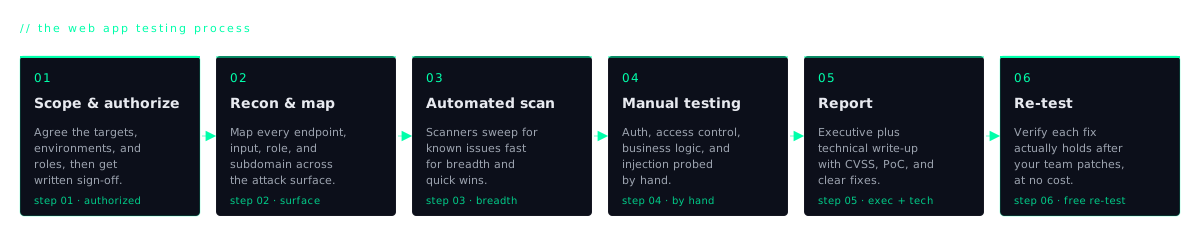
A real engagement follows a sequence. It isn't a tester poking at random. It's a deliberate progression from understanding the target to handing you something you can act on. These are the steps, in order.
1. Scoping and authorization
Before anyone touches the application, both sides agree on what's in scope (which domains, which environments, which user roles), what's explicitly off-limits, and when testing happens. Crucially, you provide written authorization. Testing a system without permission is a crime, so this paperwork is non-negotiable. Good scoping is also where you decide whether the test is against staging or production and how many user accounts the tester gets.
2. Reconnaissance and mapping the attack surface
The tester builds a complete picture of the application: every page, every API endpoint, every input field, every subdomain, the technologies in use, and how authentication flows work. You can't test what you haven't found, so this mapping stage quietly determines how thorough the whole engagement will be.
3. Automated scanning for breadth
With the surface mapped, automated scanners run across it to catch the wide, shallow layer of known issues: missing security headers, outdated components, obvious injection points, common misconfigurations. This buys coverage fast and frees the human up for the work only a human can do. The scanner's job is breadth, not depth.
4. Manual testing and exploitation
This is the core of the engagement and where most of the time goes. The tester works through each category by hand: replaying requests across two accounts to hunt access-control flaws, crafting payloads to confirm injection, walking business-logic flows looking for steps that can be skipped or abused, and chaining minor issues into a serious one. Where it's safe and in scope, findings are exploited to prove real impact rather than left as theoretical warnings. A confirmed data leak is worth far more to you than a "possible" one.
5. Reporting
Findings are written up in two registers. An executive summary tells leadership, in plain language, how exposed the application is and what the business risk is. A technical section gives each engineer a reproducible walkthrough of every issue: where it is, severity, the exact steps to trigger it, evidence, and a concrete fix. A finding nobody can reproduce is a finding nobody will fix.
6. Remediation and re-test
Your team fixes the issues, and a good vendor then re-tests to confirm the fixes actually hold, and that they didn't introduce new problems. Only after the re-test should anyone consider the engagement closed.
If you want to see this sequence play out against the clock rather than in the abstract, we wrote a day-by-day breakdown of a real 5-day test that maps each of these stages to an actual working day.
Tools vs Humans
It's tempting to assume a scanner can do all of this, because scanners are fast, cheap, and produce impressive-looking reports. They have a real role. Tools like Burp Suite, OWASP ZAP, and Nuclei give you breadth, catching the known, pattern-matchable issues across a large surface far faster than any human could.
But there's a category of flaw scanners structurally cannot find. A scanner has no concept of what a given record is supposed to belong to, so it can't tell that user A reading user B's invoice is a vulnerability. Both requests return a clean 200 OK. It doesn't understand that your checkout flow should charge before it ships, so it can't notice when the steps can be reordered. Access-control flaws and business-logic flaws require understanding intent, and intent is exactly what automation lacks.
This is why, in practice, the valuable findings in almost every engagement are human-found. The scanner clears the underbrush; the tester finds the things that actually get companies breached. A test that is only a scan is not really a security test. It's a scan with a nicer cover page.
How to Start Testing Your Web Application
If you're asking how to start security testing your web application, you don't need to commission a full engagement on day one. There's a sensible order of operations that gets you most of the value early.
- Inventory everything first. List every application, admin panel, and subdomain you own. The app you forgot about is the one that gets you breached. You cannot protect a surface you haven't enumerated.
- Run a baseline scan and fix the noise. Point a scanner like ZAP or Burp at your main app and clear the easy wins: missing headers, outdated libraries, obvious misconfigurations. This raises your floor cheaply.
- Fix the obvious auth and access issues. Tighten session expiry, kill "remember me" tokens that survive logout, and spot-check that one user genuinely can't reach another user's data. These are the highest-impact, lowest-cost fixes you can make yourself.
- Commission a manual web pentest of your most sensitive app. Once the baseline is clean, bring in a human to test the application that holds your most valuable data. That's where the findings a scanner missed will surface.
- Build testing into each release. Security isn't a one-time event. Re-scan on every release, and re-test properly whenever you ship a significant new feature or change how authentication works.
What You Get at the End
The deliverable from a proper web application security test is not a vague "you're insecure" verdict. It's a prioritised, reproducible report: every finding rated by severity, backed by evidence (requests, screenshots, proof of impact), and paired with a concrete, actionable fix. Your engineers should be able to open it, reproduce the issue, and ship the patch without a follow-up call.
With a good vendor you also get two things that matter beyond the bug list. The first is a free re-test after you've remediated, confirming the fixes hold. The second is a letter or attestation you can hand to your own clients, their procurement teams, or an auditor: the document that turns "we take security seriously" into something a third party will actually accept.
That last point is often the real reason the test happens at all. A test that produces findings your team can fix and a letter your customers will trust has done its entire job.
Web application security testing, then, is not a black box. It's a defined process (scope, recon, scan, test by hand, report, re-test) built around a standard checklist and aimed at a clear deliverable. Knowing what's inside it makes it far easier to commission well, to read the report critically, and to get genuine value from the engagement. If you're ready to run one, our web application penetration testing service covers exactly this.