There is one question every CTO asks us before signing the engagement letter: "What are you actually doing for those 5 days?" It is a fair question. From the outside, a pentest can look like a black box: money goes in, a PDF comes out, and somewhere in between a stranger pokes around your production system for a week. The deliverable lands on your desk and you have to take on faith that the time was well spent.
So here is the most useful answer we can give: this is what a typical 5-day web application pentest at VAPT.PK looks like, day by day, hour by hour. The activities, the order, and the rhythm are real. The target is anonymised: we'll call it AcmeSaaS, a Karachi-based B2B HR product with about 40 customers and a typical Node/React/Postgres stack, but every step described below is something we actually do on most engagements.
The goal of this post is to demystify the work. If you are buying a pentest for the first time, or you have bought one before and never quite understood what you paid for, this should give you a much clearer picture of where the time goes and why each phase exists.
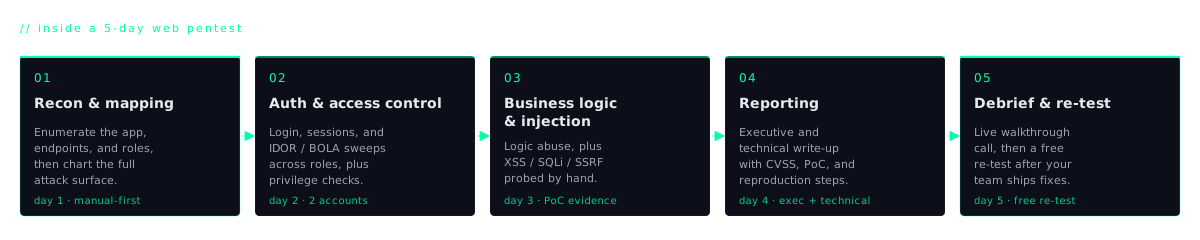
Day 0: kick-off (the half-day that decides everything)
The clock on "Day 1" doesn't actually start cold. There is roughly half a day of work that happens before any testing begins, and getting it right is the difference between a smooth engagement and a chaotic one.
It starts with a scoping call, usually one hour. We walk through the full target list together (every URL, every API, every subdomain) and agree what is in scope and what is explicitly not. We agree the test window, almost always 9am to 8pm PKT on weekdays. We agree what to do if we accidentally break something (we rarely do, but the answer should never be improvised at 2am).
From your side, we ask for a small but specific package: the production URL, two test accounts (one admin, one standard user), the staging URL if you'd prefer destructive checks live there, and a list of third-party integrations such as Stripe, SendGrid, Twilio, or any payment processor that we should not touch under any circumstances. Hitting a live payment gateway with fuzzing payloads is the kind of mistake nobody wants on their record.
From our side, we send a signed authorisation letter on VAPT.PK letterhead (the document your legal team will want on file proving the testing was contracted), an NDA if requested, and the source IP range we'll be testing from. That last one matters because if your WAF or your cloud provider blocks us on Day 1, we lose half a day in firewall politics instead of finding bugs.
Finally, we confirm an emergency contact: a phone number we can call if we hit something critical mid-test, like an exposed admin panel that's leaking customer PII right now, or a clear path to RCE. Critical findings don't wait for the final report.
Day 1: recon and surface mapping
Day 1 is about understanding the shape of the application. We are not exploiting anything yet. We are building the map that everything else will be drawn on.
Morning (9am – 1pm): Passive recon. We enumerate subdomains across every parent domain you own, fingerprint the technology stack (web server, framework, CDN, WAF, identity provider), and pull historical data from Wayback Machine and Common Crawl. The Wayback step is unglamorous but often gold: old endpoints that the dev team forgot existed, deprecated admin panels still answering on 200, legacy API versions that never got the new authorisation checks.
Afternoon (2pm – 8pm): Active mapping. We log in with the test accounts you provided and walk the entire application as a real user would: clicking every link, submitting every form, opening every modal, switching every toggle. In parallel we scrape every JavaScript bundle the front end loads, pulling out hardcoded API routes, feature flags, internal endpoints, and the occasional embarrassment like an exposed `.git/` directory or a verbose `/debug` route someone left on. We pull `robots.txt`, `sitemap.xml`, security.txt, source maps if exposed, and any storage buckets the app touches.
By the end of Day 1 we have a single document (call it the surface map) listing every endpoint, every page, every form, every API route, every cloud bucket, every third-party domain the app talks to. This phase regularly finds bugs before any actual testing has started: exposed source code, leaked credentials in JS bundles, forgotten staging environments serving prod data.
Day 2: authentication and access control
If Day 1 is the slowest day, Day 2 is the most productive. The bulk of high-severity findings on a typical engagement come from this single day, because authentication and authorisation bugs are both common and severe.
Login and credential flows. We hammer the login endpoint to test rate limiting and account lockout, looking for the gap between "we have rate limiting" and "our rate limiting actually works under bypass conditions like header rotation, X-Forwarded-For spoofing, or path-case toggling." We trace the password reset flow end to end, looking for token predictability, host header injection, race conditions, and the classic "reset link doesn't expire" mistake. If multi-factor is in place, we run through the standard MFA bypass techniques we've documented separately, because the patterns repeat across products.
Session and token handling. We inspect cookie flags (Secure, HttpOnly, SameSite), check JWTs for algorithm confusion and weak signing, look for session fixation, and verify that logout actually invalidates the server-side session and not just the client cookie.
Authorisation: the IDOR sweep. This is the slow, methodical part. Every endpoint we discovered on Day 1 gets hit as user A, then repeated as user B, then as no user at all. We compare responses. Anywhere user B can see user A's data, or an unauthenticated request can reach an authenticated endpoint, is a finding. For multi-tenant products we add a third pass: user A from tenant 1 trying to reach user B from tenant 2. Cross-tenant data leaks are catastrophic for a B2B SaaS and they are far more common than vendors believe.
On a typical AcmeSaaS-style engagement we file three to seven high or critical findings on Day 2 alone. This is also the day clients are most surprised by, partly because authorisation is invisible to almost every automated scanner, and partly because the fixes are usually small but the impact is huge.
Day 3: input handling and business logic
Day 3 is the day that separates a pentest from a vulnerability scan. Everything we do today is manual, slow, and creative.
Injection. SQL injection, NoSQL injection, command injection, server-side template injection. Modern frameworks make classic SQLi rare, but ORMs are routinely bypassed by raw query builders left in for "performance reasons," and SSTI keeps appearing in newer Node-based stacks because developers reach for templating libraries without understanding the rendering boundary.
Cross-site scripting. Reflected, stored, and DOM-based. Stored XSS in profile fields, support ticket bodies, and admin-side dashboards is a perennial source of privilege-escalation findings: a tenant user can land script in an admin's browser and you have a path to organisation-wide compromise.
SSRF and file upload abuse. Any feature that fetches a URL on the server's behalf (image previews, webhook setups, URL unfurling, document import) gets the full SSRF treatment. We try internal IPs, cloud metadata endpoints, DNS rebinding, and protocol smuggling. File upload endpoints get tested for content-type bypass, double-extension tricks, path traversal in filenames, and uploaded-file location disclosure.
Race conditions and business logic. Anywhere money, vouchers, or limited resources are involved (payment endpoints, referral credits, plan downgrades, coupon redemption) we test for concurrent-request races. We also test the product's own business rules: can a free-tier user invoke a paid feature directly by API? Can an invited user accept the invite and then escalate their own role? Can a deleted account still authenticate against cached tokens?
None of this is found by scanners. Day 3 is paid expertise applied to your specific product.
Day 4: supporting infrastructure and write-up
Day 4 splits cleanly down the middle. Morning is the last technical pass, sweeping the supporting infrastructure that wraps the application. Afternoon is where the report begins.
Morning: infrastructure. We run a full subdomain takeover sweep across every owned domain, the same methodology we used in our Yumpu takeover writeup. We check DNS hygiene, email authentication (SPF, DKIM, DMARC) (weak email config is a common reason phishing campaigns succeed against your staff and customers), TLS configuration and certificate posture, Content Security Policy and other security headers, cookie flags at the platform level, and API rate limiting at the gateway. If the application uses cloud storage, we check bucket policies and any pre-signed URL handling.
Afternoon: start the report. We do not write the report on Day 5. We write each finding as we discover it, throughout the week. Day 4 afternoon is when we sit down and turn rough notes into final form: a clean reproduction sequence, screenshots showing the bug end-to-end, a CVSS vector with justification, and (most importantly) a business impact paragraph in plain English explaining why this matters to your specific product. The CVSS score tells your security team how serious the bug is; the impact paragraph tells your CEO. Both belong in the report.
Day 5: finalise, deliver, walkthrough
Morning. Final cleanup. We re-run anything we left half-investigated, go back to any "probably nothing" leads we deprioritised earlier in the week, and run one more pass of automated checks against the now-fully-mapped surface to make sure we haven't missed something obvious. Sometimes the last finding of the engagement turns up here, because by Day 5 we understand the application well enough to know where its weak seams are.
Afternoon. Delivery. The report goes out, usually 30 to 60 pages depending on findings, with an executive summary at the front and detailed technical findings behind it. Each finding has reproduction steps, screenshots, CVSS, business impact, and a concrete remediation recommendation. We deliver via encrypted email or your preferred secure channel.
Delivery is always followed by a 30-minute walkthrough call with your engineering team. We go through every finding live, answer questions, clarify reproduction steps, and discuss remediation options. This call is non-negotiable in our process. A PDF dropped over the wall without a conversation is half-done work. The walkthrough is where developers actually understand what they are fixing.
By end of day we have delivered the report, signed an attestation letter you can show clients or auditors, and scheduled the re-test window, usually two to three weeks out, depending on your dev team's capacity. Full details of the underlying process live on our methodology page.
What happens after Day 5: the re-test
Every engagement includes a re-test. We do not charge separately for it. The model is simple: when your developers tell us the fixes are deployed (to staging or production, whichever you prefer), we spend half a day to a day and a half re-running each finding's reproduction steps against the patched build.
Confirmed fixes get marked closed in the report. Anything that wasn't fully fixed (the developer addressed the symptom but not the root cause, or the patch missed an edge case) stays open, with a note explaining what still works and what specifically needs to change. We update the report with a re-test column showing the status of every finding, re-issue the attestation letter reflecting the post-remediation state, and that final package is the document you hand to your client, your auditor, or your board.
Including the re-test in the base price is deliberate. It keeps incentives aligned: we want fixes to land, not just findings to be filed.
What 5 days doesn't include
It's worth being honest about scope. A 5-day engagement covers one production web application plus the APIs it directly uses, at normal complexity. It does not include, and we will not pretend it includes:
- Mobile applications: Android or iOS clients are a separate engagement, typically 4–7 days each, because static analysis, dynamic instrumentation, and binary inspection are entirely different toolchains.
- Cloud infrastructure: IAM review, network architecture, control-plane audit. Separate engagement, 5–10 days depending on account count and complexity.
- Internal network and Active Directory: assumed-breach scenarios, lateral movement, AD attack paths. Separate engagement, 5–7 days.
- Source code review: a different discipline from black-box testing. Scales with codebase size and language complexity.
A very large product, a microservices architecture with 30+ services, or an application with deep multi-tenant complexity may legitimately need 8–10 days for the same testing depth. We'd rather quote you honestly upfront than rush a 5-day box around a 10-day product.