When companies pay for a network pentest, they usually picture us hammering on the public IP block from the internet: port scans against the edge firewall, brute-force against the OpenVPN endpoint, fuzzing the marketing site for some forgotten Tomcat manager. That work matters, and we do it. But it's not where the damage comes from for a small-to-medium software house. The damage comes from the office Wi-Fi: the same Wi-Fi the cleaner connects to, the same Wi-Fi the new junior dev got the password for on day one because it was written on a sticky note next to the router, the same Wi-Fi every laptop on every desk is talking through right now.
This post is a field-notes tour of what we usually find on an internal network engagement at a typical Pakistani dev shop, anywhere between 15 and 200 people, mostly developers, a small ops team, maybe an IT generalist who also handles HR's printer. The findings are remarkably consistent. The fixes are too. If your office runs on a flat /24 with one Wi-Fi network and laptops that have never been re-imaged, this is your homework.
The threat model nobody draws on the whiteboard
Most security questionnaires we read focus on external attackers. SOC 2 templates ask about edge firewalls. ISO 27001 audits ask about your VPN. Cyber-insurance forms ask if you patch your public-facing servers. None of them ask the question that actually matters: what happens if somebody is already on your office network?
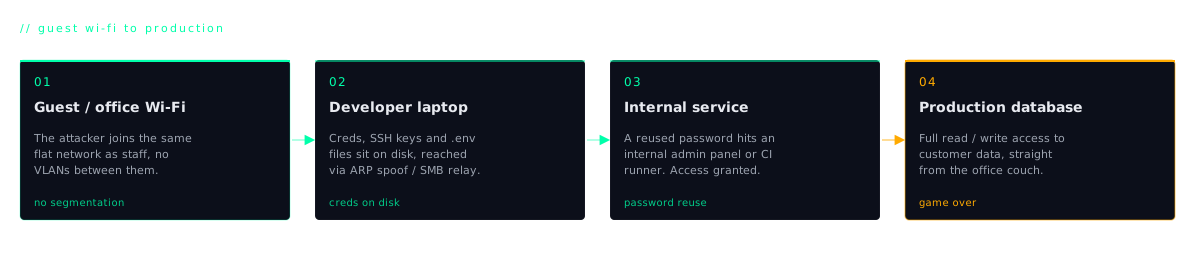
And the answer for almost every dev shop we test is the same: game over within an afternoon. The realistic compromise path looks like this. A junior dev clicks a phishing link on their personal laptop, which they bring to the office and connect to corporate Wi-Fi. The attacker has a beachhead. From that single laptop, half your production secrets are within reach because that laptop has SSH keys, AWS credentials, a logged-in GitHub session, and a `.kube/config` file. Or the attacker doesn't need a phish at all. They used an ex-employee's laptop that was never wiped after they left. Or they're a vendor doing an on-site demo and were given guest Wi-Fi, which turns out to be on the same VLAN as your prod-deployment laptop. Or your office cleaner's nephew really likes Kali.
The threat model isn't "shadowy nation-state at the firewall." It's "anyone with a foot already inside." That category is much bigger than people think, and the office network was never designed to be a security boundary against it.
What we find in the first hour of an internal test
Every engagement starts the same way. We plug into your network (either physically with a laptop on-site or via a small jumpbox we mail you) and run a basic discovery sweep. Nothing fancy, no zero-days. The findings that end up in the first hour of notes look like this, almost verbatim, across every Pakistani software house we've tested:
- SMB shares with
Everyone:Readsitting on someone's machine called something likebackuporshared. Inside:aws-keys.txt,production.env,database-backup.sql, screenshots of dashboards with API tokens visible in the URL bar. - The same local admin password on every laptop in the office. One hash dump from any machine and we can authenticate to every other machine in the building. This is by far the most common finding.
- SSH private keys with no passphrase sitting in
~/.ssh/id_rsa, with helpful comments likeprod-deploy-keyorjumpbox-aws-prod. If we can read the file, we are that key. - Logged-in browser sessions (Slack, GitHub, Jira, Linear, AWS console, GCP console) all sitting in Chrome's cookie jar. Steal the cookie file, replay the session from our machine, no MFA prompt because the session is already authenticated.
- VPN credentials for the production VPC saved in macOS Keychain or Windows Credential Manager with "remember password" checked. Once you have the laptop's local credentials, you have the VPN.
- A canonical
production-jumpboxentry in every developer's~/.ssh/config: same hostname, same user, same key path. Copy the config, copy the key, done. - A
.kube/configpointing directly at the production Kubernetes cluster with a token that doesn't expire and a role that allowsexecinto every pod.
None of these are exotic. We're not breaking cryptography. We're reading files that were left readable because nobody told the developer not to leave them readable, on machines that share an administrator password because IT set them up once in 2021 and never changed it.
How a network pentester moves from foothold to prod
Here is the chain we describe in the executive summary of almost every internal report. We're keeping it plain-English on purpose: managers and CTOs read this part, not just the engineering team.
Step 1: Get on the office network
Either the Wi-Fi password (which, statistically, was shared in a WhatsApp group at some point and has been the same for three years), or an already-compromised laptop the attacker phished, or a guest-Wi-Fi pivot, or a rogue access point in the parking lot. We assume this step is free, because for a real attacker it usually is.
Step 2: Scan and enumerate
Scan the local subnet for live hosts, SMB services, RDP, SSH, and any printers or NAS devices broadcasting their presence. List every SMB share that allows null or guest authentication. Read everything that's readable.
Step 3: Dump credentials from any machine we touch
If we land on a Windows box (through a misconfigured share, a phishing payload, or RDP) we dump LSASS memory or run Mimikatz. We get NTLM hashes for every account that has logged into that machine recently. On Linux dev laptops, we read SSH keys, browser session files, and shell history that contains pasted-in tokens.
Step 4: Spray hashes across the network
This is where most engagements break wide open. One command:
If your laptops share a local admin password (they do), this command gets us SYSTEM on every workstation in the building. If your environment is Active Directory-joined and a domain admin has ever logged into one of those workstations to install something, we now have their hash too, and the entire domain. We routinely go from "plugged in 10 minutes ago" to "domain admin" in well under an hour. It is not impressive. It is depressing.
Step 5: Walk into production
From domain admin or local-admin-on-every-box, we read every file on every machine. We find the SSH key labelled prod-deploy. We find the .aws/credentials file with a long-lived access key. We find the dev's ~/.kube/config. We SSH into the production jumpbox. We don't need to "exploit" the production environment. We just log in as your senior engineer. Their access is now our access.
Why this happens in software houses specifically
This pattern shows up everywhere, but it's especially severe in dev shops, and for understandable reasons. Developers need access to deploy. They need to debug production. They need to ship hotfixes at 11pm. So access tokens get saved locally for convenience. Nobody enforces password hygiene across employee laptops because nobody owns endpoint security. The "office network" was never meant to be a security boundary. It was meant to be a network, a place where the printer lives and the internet works.
There's a Pakistan-specific compounding factor too. A lot of teams we test run no Active Directory at all and rely on "everyone's a local admin on their own machine, IT does not get involved." This sounds simpler, and CTOs sometimes pitch it as a feature, "we don't have corporate IT slowing us down." It is actually worse for credential hygiene, not better. There's no central place to rotate passwords, no place to push a screen-lock policy, no place to enable BitLocker, no place to revoke a departed employee. The same local admin password gets reused because the IT generalist who set up the first ten laptops typed it from memory, and then typed it again, and again. Two years later, every machine in the office shares one credential.
Active Directory done badly is bad. No Active Directory at all, on a team of 80 developers, is usually worse.
What closes most of the gap, in priority order
The good news is that the fix list is short, mostly cheap, and dramatically reduces the blast radius. In priority order, top to bottom:
- Don't keep production secrets on laptops at all. This is the single highest-leverage change. Use a secrets manager (1Password, Doppler, Vault, AWS Secrets Manager, GCP Secret Manager) and inject secrets at runtime with short-lived tokens. If a laptop gets stolen tomorrow, no production credentials leave the building.
- Segment the office network. Guest Wi-Fi on its own VLAN with no route to anything internal. Prod-deployment machines (if you must have such a thing) on a separate VLAN with explicit allow rules to specific destinations only. The cleaner's phone should not be able to ARP your CTO's laptop.
- MFA on everything that touches prod. Replace static SSH keys with AWS SSM Session Manager, Teleport, or short-lived certificates from a tool like Smallstep. Enforce MFA on VPN, AWS console, GCP console, GitHub, Slack admin, and the password manager itself. A stolen laptop should not be a stolen production session.
- Disable SMB1, audit every share.
Everyone:Readis a non-starter on any share. Make a list of every share on every machine in the office. If it doesn't need to exist, delete it. If it does, lock it to specific users. - Rotate the office Wi-Fi password every quarter and immediately on any departure. Use WPA2-Enterprise with per-user credentials if you can. It's not as hard to set up as people think, and it eliminates the "one password everyone knows" problem.
- Turn on endpoint protection that actually flags Mimikatz. Microsoft Defender for Endpoint catches the obvious tooling on Windows. For Mac, use something like CrowdStrike or SentinelOne, or at minimum enable Gatekeeper and FileVault. It will not stop a determined attacker, but it raises the cost of the casual one significantly.
- Stop sharing local admin passwords. Either deploy LAPS (Microsoft's Local Administrator Password Solution) which randomises the local admin password per machine, or move to managed devices where no human knows the local admin password at all.
You do not need to do all of this in a month. You need to do the first two in a quarter. If you do nothing else, get the production secrets off the laptops and put the guests on their own VLAN. Those two changes alone reduce most of the realistic risk.
What a real internal network engagement looks like
An internal network pentest with us is typically a 3-to-7 day engagement, either on-site at your Karachi, Lahore, or Islamabad office, or remote via a small jumpbox we ship you and you plug into the network. We start from a defined assumed-breach position (either guest Wi-Fi, or a "compromised junior dev laptop" simulation) and we narrate every step we take toward production. The deliverable isn't a Nessus dump. It's a chained attack story: "Starting from guest Wi-Fi at 09:14, we identified an open SMB share on HOST-DEV-12 by 09:31, recovered a local admin hash by 10:02, achieved domain admin by 11:40, and read the production database backup by 12:08."
That narrative, plus a prioritised remediation list, is what closes board-level and customer-questionnaire concerns much faster than a generic checklist scan. You can see the full scope, deliverables, and pricing on our Network Penetration Testing page.
If you've read this far and thought "yeah, that's us" at any point, you already know what the report is going to say. The question is whether you'd rather read it from us, with a fix list and a re-test window, or read about it in the news.