When we pentest a mobile app, the first thing we do isn't reverse engineering, dynamic instrumentation, or Frida. It's much dumber than that: we unzip the APK and grep for secrets. About 7 out of 10 Android apps we test ship with at least one API key, AWS access key, Firebase URL, or third-party token baked into the binary. The fix is usually trivial. The finding is always embarrassing, especially when the report lands on the desk of an overseas client whose security questionnaire explicitly asks "do you store secrets in the mobile binary?"
This post shows you exactly how we look, in the order we look, with the exact commands we run. If you're a developer or a tech lead shipping an Android app, you can run this audit on your own APK in about five minutes and clean up everything you find before any external party (us, your client's auditor, or someone less friendly) runs the same commands. Consider this the floor of mobile app security: if you can't pass this audit, the rest doesn't matter yet.
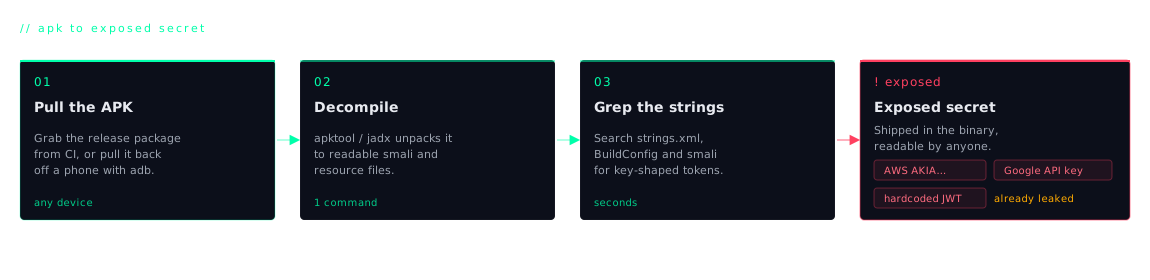
Why this happens, and why it's worse than it sounds
Most developers treat the APK as a "compiled" artefact. Mentally it sits in the same bucket as a stripped C binary: something opaque, something an attacker would need real skill to read. That mental model is wrong. An APK is a zip file with a different extension. Inside it are XML resource files, a manifest, image assets, JSON config blobs, and Dalvik bytecode (DEX) that decompiles cleanly back to readable Java or Kotlin. Anyone with unzip and apktool (both free, both ten seconds to install) can read everything you shipped.
"Everything you shipped" is the part that hurts. We have pulled live AWS access keys out of strings.xml. We have pulled Firebase Realtime Database URLs out of google-services.json where the database had no security rules and we could read every user's data with a single curl. We have pulled Twilio SIDs, SendGrid tokens, Mailgun keys, Razorpay live secrets, Google Maps server keys, and OAuth client secrets that the developer assumed were "client-side anyway, so it's fine." None of it was fine.
The two examples we use when we explain impact to non-security stakeholders: someone uses your leaked AWS access key to spin up a few dozen GPU instances and mine crypto on your bill until you notice the invoice. Someone uses your leaked SendGrid token to send a phishing wave with your domain as the verified sender. And now your customers' inboxes show a "legit" email from you asking them to log in via a fake URL. Both happen. Both are recoverable. Neither is fun.
The 5-minute audit: exactly what we do
Here is the workflow, start to finish. You need apktool installed (it ships in most package managers) and a shell. That's it.
Step 1: get the APK. If you build your own app, the easiest path is to grab the release APK out of your CI artefacts. If you only have a Play Store listing, install the app on a device and pull it back with adb shell pm path com.your.package followed by adb pull. You want the actual production APK, not a debug build. Debug builds sometimes contain extra junk that won't ship, and we want to know what real users have on their phones.
Step 2: decode it. apktool takes the zip apart and decodes the binary XML back into something readable:
You now have a decoded/ directory with res/, assets/, smali/, AndroidManifest.xml, and everything else the app shipped. This is exactly what an attacker sees.
Step 3: grep for the obvious stuff. This single command catches the bulk of real-world findings. Run it from the parent directory of decoded/:
Those prefixes are the recognisable starts of common credentials: AKIA is an AWS access key, AIza is a Google API key, sk_live is a Stripe live secret, xoxb is a Slack bot token, ghp_ is a GitHub personal access token. The trailing keywords catch generic naming patterns. You will get false positives. You will also get exactly the line of the exactly the file you were hoping nobody would ever look at.
Step 4: open the obvious files by hand. Open decoded/res/values/strings.xml in your editor and read it top to bottom. Then look in decoded/assets/. Developers love dropping config.json, firebase_options.json, credentials.properties, or .env-style files in there because "assets are part of the build, that's fine." Anything in assets/ ships with the APK and is trivially readable.
Step 5: check the SMALI. SMALI is the human-readable form of the DEX bytecode. You don't need to understand it; you just need to grep it for URLs, tokens, and base64 blobs that look suspicious. Sometimes a dev knows not to put a secret in strings.xml and instead pastes it into a Java string literal, which ends up in SMALI as plain text anyway.
Step 6: read the manifest. Open decoded/AndroidManifest.xml and look at every <meta-data> entry. This is a common spot for Google Maps API keys, Facebook app IDs and secrets, OneSignal app IDs, AppsFlyer dev keys, and dozens of similar SDK integrations. Some of those values are designed to be public; some absolutely are not.
What we usually find
After running this audit on dozens of real APKs, the findings cluster into a handful of categories. Anonymised but real:
- Google Maps API key in
strings.xml. If it isn't restricted by Android package name + signing-cert SHA-1 in the Google Cloud console, an attacker can copy it into their own app and burn through your quota, and your bill. - Firebase Realtime Database URL with open rules. The URL ships in
google-services.json; if the database rules are".read": true, ".write": true(still the default during development), every record is readable and writable by anyone. We have walked away with entire user tables this way. - AWS access key + secret for direct S3 uploads from the app. Almost always over-privileged. We have seen keys with
s3:*on every bucket in the account. An attacker can read everything, delete everything, or spin up EC2 to mine crypto. - Razorpay / JazzCash / Easypaisa keys promoted from test to live. The test key works fine, then someone replaces it with the live key in a hurry before launch and forgets it's still embedded client-side. An attacker can call payment APIs in your merchant's name.
- SendGrid or Mailgun token used for transactional email. Lets an attacker send mail as your verified domain. Perfect for phishing your own customers.
- OAuth client secrets: Facebook, Google, Apple. "Client secret" is a misnomer on mobile: there is no safe place to store one. Yet we find them committed to
strings.xmlconstantly. With the secret, an attacker can impersonate your app's identity to the OAuth provider.
What "looks like a secret" but isn't
The grep will fire on things that look alarming but are actually meant to be public. Knowing the difference saves you a wasted afternoon:
- Firebase web config (the
apiKey,authDomain,projectIdblock). Google explicitly documents this as safe to ship, provided your Firestore / Realtime Database / Storage rules are locked down. If your rules are wide open, the key isn't the problem; your rules are. - Google Maps API key that has been restricted in the Cloud console to your app's package name + SHA-1 fingerprint. The string is "public" but useless to anyone else.
- Sentry DSN (public key). Designed to be embedded; only allows sending events to your project, not reading them.
- Stripe publishable key (
pk_live_…). Public by design;sk_live_…is the dangerous twin.
The rule of thumb we use: can someone abuse this key from a different package, off your domain, with no further information? If yes, it's a secret and it shouldn't be in the APK. If no (because the provider scopes it to your app/origin/project), it's a public identifier and you can ship it.
The fix: how to actually keep secrets out of your APK
The good news is the remediation is mostly architectural and you only have to do it once.
- Move secrets server-side. Your Android app calls your backend. Your backend calls the third-party (Twilio, SendGrid, OpenAI, payment gateway, whatever) with the secret. The app never sees the key. This is the only real fix for the vast majority of cases.
- For keys that genuinely have to ship (Maps, push providers, analytics SDKs), restrict them in the provider's console. Google Maps, Firebase, and similar all support package-name + SHA-1 fingerprint restrictions. Set them. Test that the app still works. Then revoke the unrestricted version of the key.
- For build-time configuration that varies between dev / staging / prod, use a
gradle.propertieskept out of source control plusBuildConfigfields. But understand:BuildConfigvalues still end up in the APK as plain strings. This is for configuration, not for secrets. - Rotate every key currently in your app. Assume every secret in a shipped APK is already leaked, because it effectively is. Anyone who downloaded any previous build has it forever. Rotate now, before the audit, so the keys we find in your archived APKs are already dead.
- Add a CI check. A simple
gitpre-commit hook or a GitHub Actions step that runs the samegrepfrom Step 3 against yourres/andassets/directories will catch 90% of regressions before they ship. Tools likegitleaksandtrufflehogdo the same job with fancier output.
When the audit isn't enough: what a real mobile pentest catches
Hardcoded secrets are the floor of mobile security, not the ceiling. A full mobile pentest from us also covers certificate pinning bypass, root- and emulator-detection bypass, insecure local storage (SharedPreferences, SQLite, the Keystore), exported components and intent injection, deep-link hijacking, WebView misconfiguration, runtime hook detection (Frida / Objection), tapjacking, and a long list of OWASP MASVS controls. The grep audit is the warm-up; the rest is the workout. If you'd like a complete look, our Mobile App VAPT service covers the full MASVS-aligned checklist for both Android and iOS, with a report your security team and your client's security team can both action.
But seriously, run the grep first. It costs nothing, takes five minutes, and the things it finds are almost always trivial to fix once you know they exist. We would rather start your engagement on the harder stuff.